Winter Wonderland 3-Panel Photo Prompt
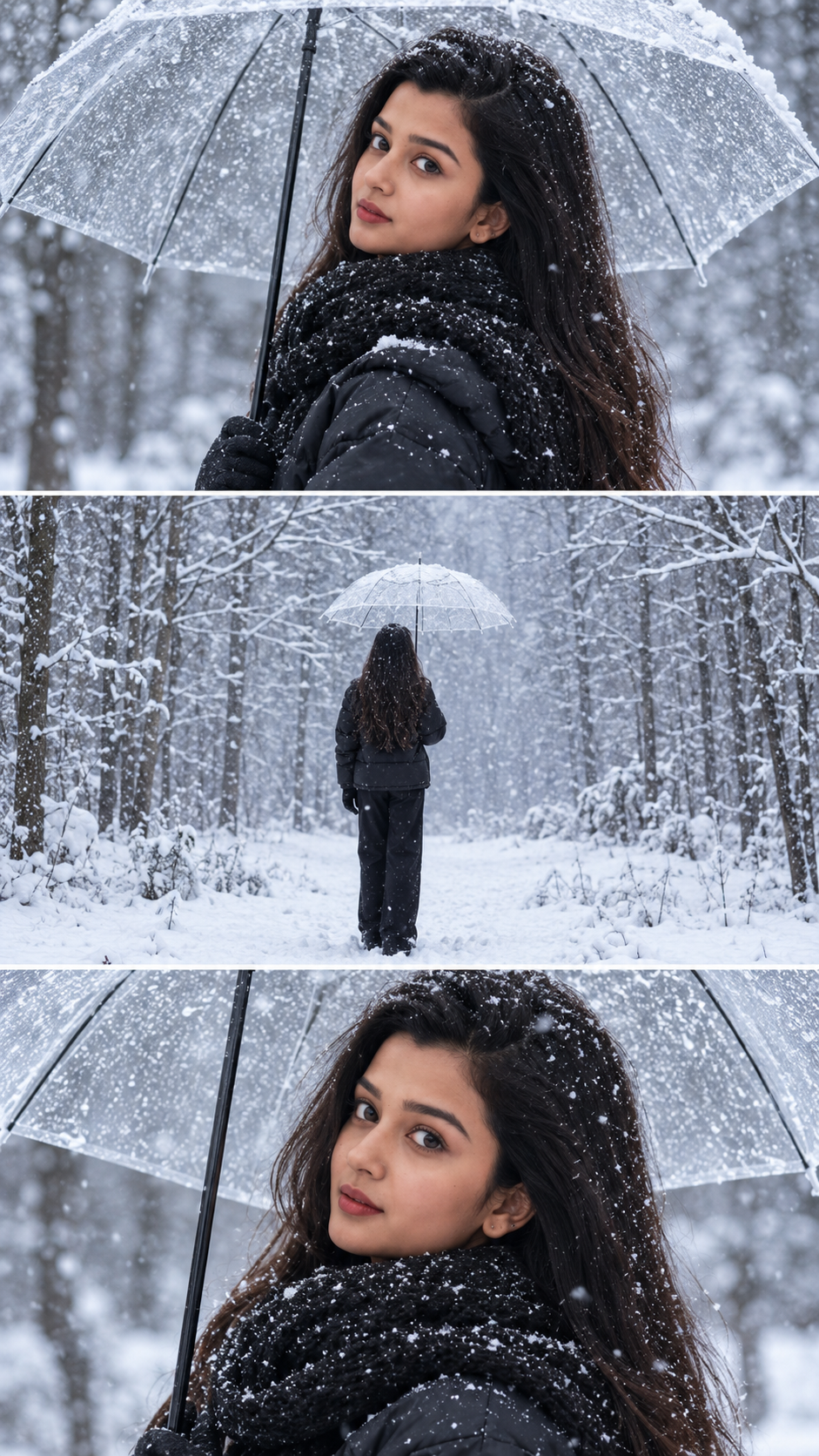
Create a photorealistic 9:16 winter collage of three panels featuring the user’s face under a transparent umbrella, black winter gear, and snowy fo...
Details & Features
Details & Features
Winter Wonderland 3-Panel Photo Prompt
Create a photorealistic 9:16 winter collage of three panels featuring the user’s face under a transparent umbrella, black winter gear, and snowy fo...
🎨 Key Highlights & Features:
• Designed and optimized for instant, repeatable results
• Carefully tuned parameters for professional commercial outputs
• Easy to customize variables for rapid iteration
• Compatible with leading AI generation workflows
🔍 SEO Keywords & Target Applications:
AI Image Prompts, ai images prompt generator, ai images prompt, ai image prompt copy paste, ai images prompt for boys, ai images prompt for girls, ai images prompt free, ai images prompt for men, ai images prompt website, ai images prompt for couples, midjourney prompts, flux ai prompts, dall-e prompts, stable diffusion prompts, photorealistic ai prompt, 8k hyperrealistic ai prompt, ai portrait prompt, cinematic ai image prompt, ai art prompt generator, text to image ai prompt.
Customer Reviews
No reviews yet. Be the first to share your thoughts!
The Genius Prompt
❄️ Winter Wonderland — Reference Image Identity-Preservation Master Prompt

REFERENCE IMAGE INSTRUCTIONS:
Use the uploaded reference image as the exact visual guide for the composition, winter environment, camera angles, clothing, transparent umbrella, snowfall, lighting, and three-panel layout.

Use the user's uploaded personal photo as the identity reference for the woman.

1. Identity Preservation — Highest Priority

Use the person in the user's uploaded photo as the main subject in all three panels. Preserve her recognizable facial identity, face shape, eyes, eyebrows, nose, lips, skin tone, and natural facial proportions.

Do not copy the face of the woman in the composition reference. Replace her with the person from the user's uploaded photo while maintaining the original winter photography style.

If the uploaded photo shows a different hairstyle, adapt it naturally to the winter styling while keeping the person's recognizable identity. Create one consistent person across all three panels.

2. Match the Reference Composition

Recreate the reference image as a vertical 9:16 collage containing exactly three stacked horizontal photographs.

Top panel: A medium close-up of the woman standing under a transparent umbrella, looking toward the right. Long natural-looking hair frames her face, and a thick black knitted scarf covers her neck. Snowflakes rest on her hair, scarf, and black puffer jacket.

Middle panel: A wide rear-view photograph of the same woman standing alone in a snowy clearing. She wears the same black winter outfit and holds the transparent umbrella above her head. A peaceful forest of snow-covered, leafless trees stretches into the distance.

Bottom panel: An intimate front-facing close-up of the same woman beneath the transparent umbrella. Her eyes and facial features are clearly visible, her cheeks are naturally rosy from the cold, and her thick black scarf fills the lower foreground. Small snowflakes cling naturally to her hair and clothing.

3. Clothing & Accessories

A black quilted winter puffer jacket, oversized chunky black knitted scarf, black trousers, and black winter gloves. A large transparent umbrella with realistic black ribs and a dark handle. Keep the outfit consistent across all three panels.

4. Snowy Environment

A realistic winter forest with fresh white snow covering the ground and tree branches. Gentle snowfall, delicate snowflakes on the subject, soft winter mist, and a quiet, cinematic atmosphere. Use cool white, pale gray, and muted blue tones.

5. Photography & Lighting

Professional photorealistic winter fashion photography, natural overcast daylight, realistic skin texture, sharp facial details, shallow depth of field in the portrait panels, natural background blur, accurate fabric textures, and realistic snow.

6. Strict Reference Matching

Follow the uploaded composition reference closely. Preserve the three-panel arrangement, the transparent umbrella, the black winter outfit, the camera angles, the snowy forest, and the overall cool color grading.

Only the subject's identity should change to match the user's uploaded photo. Keep the same person recognizable throughout the collage.

Output: Vertical 9:16, ultra-realistic, high-resolution photography, three horizontal panels, no text, no watermark, no social media interface, no extra panels, no cartoon or CGI appearance.
Usage Instructions
AI Model / Engine
Tags
What you get
Details & Features
Winter Wonderland 3-Panel Photo Prompt
Create a photorealistic 9:16 winter collage of three panels featuring the user’s face under a transparent umbrella, black winter gear, and snowy fo...
🎨 Key Highlights & Features:
• Designed and optimized for instant, repeatable results
• Carefully tuned parameters for professional commercial outputs
• Easy to customize variables for rapid iteration
• Compatible with leading AI generation workflows
🔍 SEO Keywords & Target Applications:
AI Image Prompts, ai images prompt generator, ai images prompt, ai image prompt copy paste, ai images prompt for boys, ai images prompt for girls, ai images prompt free, ai images prompt for men, ai images prompt website, ai images prompt for couples, midjourney prompts, flux ai prompts, dall-e prompts, stable diffusion prompts, photorealistic ai prompt, 8k hyperrealistic ai prompt, ai portrait prompt, cinematic ai image prompt, ai art prompt generator, text to image ai prompt.
Customer Reviews
No reviews yet. Be the first to share your thoughts!
Earn by Selling Prompts
Are you a prompt engineer? Start selling prompts on Omexa and generate sales income.