AI Stack Tower Game Prompt
Build a polished Stack Tower game with AI using HTML, CSS & JavaScript.
Details & Features
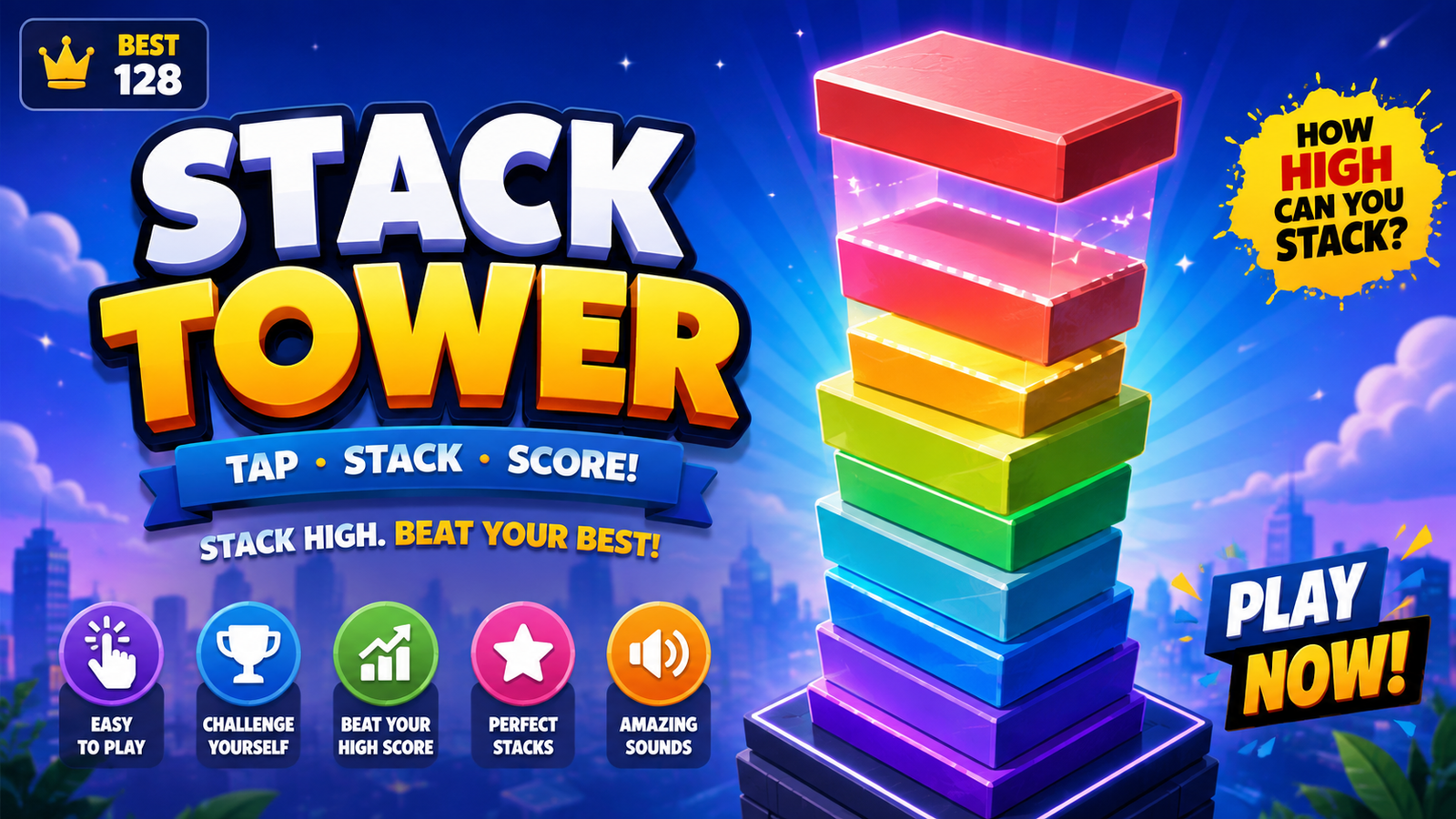
Build a complete, polished and addictive Stack Tower game using AI with this detailed HTML5, CSS and JavaScript coding prompt.
Create a mobile-friendly tower stacking game where players tap to drop moving blocks, stack them accurately, earn points, build combos and beat their high score.
Includes:
🧱 Smooth block stacking mechanics
🎯 Perfect stack detection
🏆 Score & best score system
🔥 Combo system
📱 Touch, mouse & keyboard controls
🎥 Smooth camera-follow system
🌈 Dynamic backgrounds
✨ Particles & animations
🔊 Web Audio sound effects
⏸️ Pause & resume
💾 LocalStorage saving
📱 Responsive mobile design
⚡ 60 FPS optimized Canvas gameplay
💀 Polished game-over screen
The prompt specifically addresses camera scrolling, ensuring platforms don't continuously move upward and remain correctly aligned as the tower grows.
Customer Reviews
No reviews yet. Be the first to share your thoughts!
The Genius Prompt
Create a complete, polished, highly addictive 2D mobile browser game called "STACK TOWER" using only HTML, CSS, and vanilla JavaScript.

Use HTML5 Canvas for the gameplay.

The game must work immediately by opening index.html in a modern browser.

DO NOT use:
- React
- Phaser
- Three.js
- Unity
- npm
- External libraries
- Backend services
- External game assets

Create exactly:
1. index.html
2. style.css
3. script.js

==================================================
1. CORE GAMEPLAY
==================================================

Create a one-tap tower stacking game.

A block continuously moves horizontally from left to right and then right to left above the tower.

The player taps/clicks to drop the moving block.

The goal is to stack each block on top of the previous block as accurately as possible.

When the player drops a block:

1. Calculate the horizontal overlap with the previous block.
2. If there is overlap, keep only the overlapping portion.
3. The non-overlapping portion falls away with a smooth animation.
4. The remaining portion becomes the new platform.
5. Spawn the next moving block.
6. Continue the game.

If there is zero overlap:

- The block falls.
- Play the game-over effect.
- End the game.

==================================================
2. MOST IMPORTANT — CAMERA AND PLATFORM BEHAVIOR
==================================================

IMPORTANT: DO NOT make the platforms continuously move upward.

Previously placed platforms must remain fixed relative to each other.

The tower itself must NOT continuously move upward.

The actual WORLD Y position of every platform must remain unchanged after it is placed.

Use a separate camera system.

Maintain:

cameraY

and render each platform using:

screenY = worldY - cameraY

Do NOT modify platform.worldY every frame to simulate scrolling.

==================================================
3. CORRECT CAMERA SCROLLING
==================================================

At the beginning of the game:

- Keep the camera stationary.
- The tower should grow upward normally.
- Do not scroll the screen immediately.

Only start moving the camera when the newest block reaches a vertical threshold near the upper portion of the screen.

For example:

camera threshold = approximately 40–50% of the playable screen height.

When the newest block crosses this threshold:

- Smoothly increase cameraY.
- Keep the newest block in a comfortable visible position.
- Move the camera only as much as necessary.

Use smooth interpolation rather than instantly moving the camera.

For example, conceptually:

cameraY += (targetCameraY - cameraY) * smoothing

The exact implementation can be adjusted for smooth 60 FPS gameplay.

IMPORTANT:

The camera must NOT continuously move upward every frame.

The camera moves only when the tower becomes tall enough to require additional vertical view.

==================================================
4. WORLD COORDINATES VS SCREEN COORDINATES
==================================================

Separate the game world from the camera.

Each platform should have permanent world coordinates:

platform.x
platform.worldY
platform.width
platform.height

When rendering:

screenX = platform.x
screenY = platform.worldY - cameraY

Do NOT change platform.worldY when the camera moves.

The relative distance between all stacked platforms must remain exactly the same.

After camera scrolling:

- Platforms must stay perfectly aligned.
- No gaps should suddenly appear.
- No platforms should move independently.
- No platform should drift upward or downward relative to another platform.

The camera is only a VIEWPORT.

==================================================
5. STACKING PHYSICS
==================================================

The moving block should move horizontally.

When the player taps:

Calculate:

overlapLeft = max(currentBlock.x, previousBlock.x)

overlapRight = min(
    currentBlock.x + currentBlock.width,
    previousBlock.x + previousBlock.width
)

overlapWidth = overlapRight - overlapLeft

If overlapWidth <= 0:

GAME OVER.

If overlapWidth > 0:

Create the new stacked block using the overlapping section.

The non-overlapping section should fall downward with gravity.

==================================================
6. PERFECT STACK
==================================================

If the moving block is very close to the previous block's center:

Treat it as:

PERFECT!

Snap the block into perfect alignment.

Do not unnecessarily reduce its width.

Add:

- Particle burst
- Small visual flash
- Satisfying sound
- Combo increase
- Small "PERFECT!" text animation

Perfect stacking should feel rewarding.

==================================================
7. GAMEPLAY SPEED
==================================================

The game must be easy to play initially.

Do NOT make blocks move too fast.

Starting movement speed should be comfortable.

Gradually increase speed as the tower becomes higher.

Suggested progression:

Height 1–10:
Very easy movement speed.

Height 11–25:
Slightly faster.

Height 26–50:
Moderate speed.

Height 51+:
Gradually increase difficulty.

Never make the game suddenly impossible.

The player should have enough time to judge the block position.

==================================================
8. BLOCK DESIGN
==================================================

Create attractive colorful blocks using Canvas.

Each new block can have a different color.

Use:

- Gradients
- Highlights
- Shadows
- Subtle 3D depth
- Rounded or polished edges where appropriate

Keep the blocks visually consistent.

Make the tower look satisfying as it grows.

==================================================
9. BLOCK FALLING EFFECT
==================================================

When part of a block is cut off:

Animate the removed section falling downward.

Apply:

- Gravity
- Rotation
- Fade-out
- Slight horizontal movement

The falling piece should disappear after leaving the visible area.

Do not allow falling pieces to interfere with gameplay collision.

==================================================
10. SCORING
==================================================

Increase the score after every successful stack.

Display:

CURRENT SCORE

BEST SCORE

Save BEST SCORE using localStorage.

The best score must survive:

- Game restart
- Page refresh
- Closing and reopening the browser

==================================================
11. COMBO SYSTEM
==================================================

Add a simple combo system.

Consecutive accurate stacks increase the combo.

Show:

COMBO x2
COMBO x3
COMBO x4

etc.

Perfect stacks should increase the combo.

Poor stacks can reset the combo.

Add small visual feedback.

Do not make the combo system complicated.

==================================================
12. START SCREEN
==================================================

Create a polished start screen.

Display:

STACK TOWER

Subtitle:

TAP TO STACK

Show:

- Best score
- PLAY button
- Sound button

Add a subtle animated block demonstration.

The start screen should look like a professional mobile game.

==================================================
13. GAMEPLAY UI
==================================================

During gameplay display:

Top center:
Current score

Top left:
Best score

Top right:
Pause button
Sound button

Keep the interface clean and unobtrusive.

Do not cover the active block or tower.

==================================================
14. PAUSE
==================================================

Add a pause button.

When paused:

- Stop block movement.
- Stop physics.
- Stop falling pieces.
- Stop camera movement.
- Stop gameplay animations.
- Keep the current game state unchanged.

Display:

PAUSED

RESUME

RESTART

When resumed, continue exactly where the player paused.

==================================================
15. GAME OVER
==================================================

When the player completely misses the previous block:

- Stop gameplay.
- Stop camera movement.
- Animate the failed block falling.
- Play a game-over sound.
- Add a subtle screen shake.

Show:

GAME OVER

SCORE: XX

BEST: XX

If a new record was achieved:

NEW BEST!

Buttons:

PLAY AGAIN

HOME

==================================================
16. MOBILE CONTROLS
==================================================

The entire game canvas should be tappable.

Controls:

Touch:
Drop block.

Mouse:
Drop block.

Spacebar:
Drop block.

Enter:
Start/restart where appropriate.

Touch input must be extremely responsive.

Prevent accidental page scrolling while playing.

Use appropriate touch-action settings.

Do not trigger multiple drops from a single touch event.

==================================================
17. RESPONSIVE DESIGN
==================================================

The game must work correctly on:

- Android phones
- iPhones
- Tablets
- Desktop browsers

Use a responsive Canvas.

Maintain the correct aspect ratio.

Adapt gameplay dimensions to the actual screen size.

The tower must remain centered.

The current moving block must always remain visible.

Do not allow UI elements to overlap important gameplay.

==================================================
18. CAMERA RESPONSIVENESS
==================================================

The camera must work correctly on different screen sizes.

Calculate the camera threshold relative to Canvas height.

Do not use a hardcoded screen coordinate that only works on one phone.

The camera should follow the tower smoothly.

IMPORTANT:

If the tower is not high enough, cameraY must remain unchanged.

If the tower becomes high enough:

targetCameraY should increase only enough to keep the newest platform visible.

When the tower stops growing:

cameraY should stop.

There must be NO continuous upward camera movement.

==================================================
19. BACKGROUND
==================================================

Create a beautiful dynamic background.

Start with:

- Bright sky
- Clouds
- Soft gradient
- Simple distant landscape

As the tower becomes higher, gradually transition to:

- City skyline
- Sunset
- Evening
- Night sky

The background should move subtly with the camera to create depth.

However, the tower's world coordinates must remain unchanged.

==================================================
20. PARALLAX EFFECT
==================================================

Optional lightweight parallax:

Background clouds and scenery may move at different speeds relative to the camera.

For example:

Background layer:
cameraY * 0.2

Midground:
cameraY * 0.5

Tower:
cameraY * 1.0

Do not apply parallax calculations to the actual world positions of tower blocks.

Only their rendered screen position should change.

==================================================
21. PARTICLES
==================================================

Add lightweight particle effects for:

- Successful stack
- Perfect stack
- Combo
- Game over

Particles should be optimized for mobile.

Do not create hundreds of particles.

==================================================
22. SOUND
==================================================

Use Web Audio API.

Do not require external sound files.

Create simple original sounds for:

- Button click
- Block drop
- Successful stack
- Perfect stack
- Combo
- Game over

Add a sound ON/OFF button.

Save the sound preference using localStorage.

==================================================
23. ANIMATIONS
==================================================

Add smooth animations for:

- Moving blocks
- Block placement
- Cut-off pieces
- Falling pieces
- Perfect stack
- Score change
- Combo
- Camera movement
- UI panels
- Game-over screen

Animations should be smooth and lightweight.

==================================================
24. PERFORMANCE
==================================================

Use:

requestAnimationFrame()

for the main game loop.

Target 60 FPS.

Optimize Canvas rendering.

Avoid unnecessary DOM manipulation during gameplay.

Avoid memory leaks.

Remove expired particles and falling pieces.

Do not create unnecessary objects every frame.

The game must perform well on low-end and mid-range Android phones.

==================================================
25. GAME STATE MANAGEMENT
==================================================

Use clear game states:

MENU
PLAYING
PAUSED
GAME_OVER

Do not allow gameplay logic to continue while the game is paused or over.

Restarting must completely reset:

- Score
- Combo
- Tower
- Current block
- Camera position
- Falling pieces
- Particles
- Difficulty
- Game state

==================================================
26. BUG PREVENTION
==================================================

Before returning the final code, carefully test and verify:

1. Platforms do NOT continuously move upward.
2. Existing platforms maintain their exact relative positions.
3. Platform worldY values never change because of camera movement.
4. Camera scrolling only starts when the tower becomes tall enough.
5. Camera scrolling stops when the newest block is comfortably positioned.
6. Camera movement is smooth.
7. No sudden camera jumps.
8. No platform drifting.
9. No platform separation caused by scrolling.
10. No duplicated platforms.
11. Collision detection works correctly.
12. Overlap calculation is accurate.
13. Perfect stack detection works.
14. Cut-off pieces fall correctly.
15. Falling pieces cannot affect gameplay.
16. Score increases exactly once per successful stack.
17. Combo works correctly.
18. Restart resets everything.
19. Pause freezes everything correctly.
20. Resume continues correctly.
21. Touch input works.
22. Mouse input works.
23. Spacebar works.
24. Browser scrolling is prevented during gameplay.
25. Best score is saved correctly.
26. Sound preference is saved correctly.
27. Canvas works on different screen sizes.
28. The moving block never becomes impossible to see.
29. Camera never scrolls infinitely.
30. No JavaScript errors occur.

==================================================
27. IMPORTANT CAMERA TEST
==================================================

Perform a conceptual test:

Start the game.

Stack 5–10 blocks.

Expected:
The tower grows upward but the camera mostly remains stationary.

Continue stacking.

When the newest block reaches the upper camera threshold:

Expected:
The camera smoothly moves upward.

After moving:
All previously stacked platforms must remain perfectly aligned.

Continue stacking.

Expected:
The camera follows the tower only when necessary.

Stop stacking.

Expected:
The camera stops.

There must NEVER be a situation where the entire tower continuously moves upward even when no new block is being added.

==================================================
28. FINAL QUALITY REQUIREMENT
==================================================

Do NOT create a rough prototype.

Create a complete, polished, professional-quality Stack Tower game.

Priorities:

1. PLAYABILITY
2. CORRECT STACKING
3. CORRECT CAMERA SYSTEM
4. RESPONSIVE CONTROLS
5. VISUAL QUALITY
6. PERFORMANCE

The game should feel satisfying and addictive.

The tower should visually grow upward naturally.

The camera should follow the tower naturally without making the platforms themselves move.

The final game must be fully playable immediately.

Return the complete contents of:

1. index.html
2. style.css
3. script.js

Do not leave placeholder code.
Do not omit functions.
Do not provide pseudocode.

Provide complete working code.
Usage Instructions
Tags
What you get
Build a complete, polished and addictive Stack Tower game using AI with this detailed HTML5, CSS and JavaScript coding prompt.
Create a mobile-friendly tower stacking game where players tap to drop moving blocks, stack them accurately, earn points, build combos and beat their high score.
Includes:
🧱 Smooth block stacking mechanics
🎯 Perfect stack detection
🏆 Score & best score system
🔥 Combo system
📱 Touch, mouse & keyboard controls
🎥 Smooth camera-follow system
🌈 Dynamic backgrounds
✨ Particles & animations
🔊 Web Audio sound effects
⏸️ Pause & resume
💾 LocalStorage saving
📱 Responsive mobile design
⚡ 60 FPS optimized Canvas gameplay
💀 Polished game-over screen
The prompt specifically addresses camera scrolling, ensuring platforms don't continuously move upward and remain correctly aligned as the tower grows.
Customer Reviews
No reviews yet. Be the first to share your thoughts!
Earn by Selling Prompts
Are you a prompt engineer? Start selling prompts on Omexa and generate sales income.