KNIFE RUSH — AI Game Builder Prompt
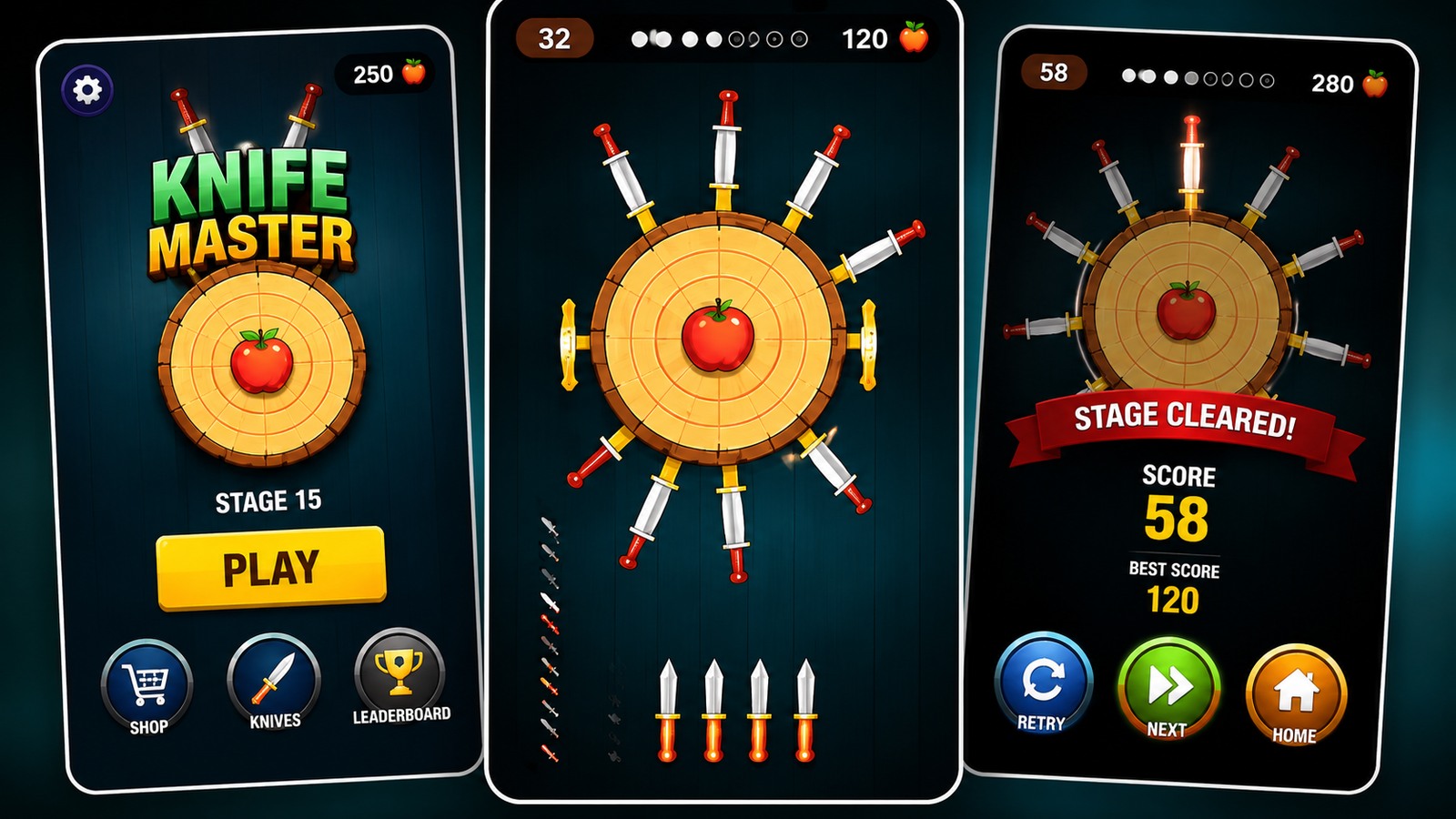
Build a premium KNIFE RUSH web game with one AI prompt—featuring knife throwing, fruit slicing, combos, levels, effects, skins, achievements, and responsive gameplay.
Details & Features
KNIFE RUSH — Complete AI Game Builder Prompt
Turn a single AI prompt into a complete, playable premium mobile web arcade game.
This detailed master prompt is designed to guide AI coding tools to build KNIFE RUSH, an original knife-throwing arcade game with satisfying fruit-slicing mechanics, progressive difficulty, polished effects, and mobile-first gameplay.
🎮 What's Included
🔪 Responsive knife-throwing gameplay
🎯 Rotating target/wheel system
🧠 Accurate knife collision detection
🔄 Correct radial knife positioning and rotation
🍎 Visible fruits placed around the rotating wheel
🍉 Fruit slicing mechanics and unique effects
✨ Golden fruit bonuses
🎯 Perfect-hit system
🔥 Combo & Fruit Combo system
💥 Fruit Frenzy moments
📈 Endless level progression
⚡ Progressive difficulty
🏆 Achievements
🔪 Unlockable knife skins
📅 Daily Challenge
💾 LocalStorage save system
🔊 Arcade-style audio feedback
📱 Mobile, tablet & desktop support
🖱️ Touch + mouse controls
⏸️ Pause/resume system
🎨 Premium dark arcade UI
✨ Particles, screen shake, slow motion & impact effects
🚀 Performance-focused Canvas rendering
⭐ Special Focus: Correct Knife Logic
The prompt specifically instructs the AI to correctly calculate:
attachment angle → wheel rotation → world position → knife orientation
This ensures attached knives:
Stay locked to their actual impact positions
Rotate with the wheel
Always point outward from the center
Never randomly change direction
Don't appear sideways or tangentially
🍓 Fruit System
Unlike a basic knife-throwing game, fruits are a core gameplay element.
The prompt instructs the AI to visibly place 2–5 fruits around the wheel, rotate them with the target, maintain fair spacing, and allow players to slice them for bonus points.
💎 Designed for
Perfect for creators, developers, AI builders, students, and anyone experimenting with AI-powered game development using modern browser technologies.
The prompt is designed around:
HTML + CSS + JavaScript + Canvas + Web Audio + LocalStorage
No backend is required.
🚀 Final Goal
The prompt is optimized to make the AI build something that feels like a real premium mobile arcade game, rather than a basic AI-generated coding demo.
Customer Reviews
No reviews yet. Be the first to share your thoughts!
The Genius Prompt
BUILD THE COMPLETE GAME — KNIFE RUSH

Build a complete, polished, production-ready mobile web game called KNIFE RUSH in one go.

Do not create a prototype, mockup, tutorial, pseudocode, or partial implementation. Actually build the fully playable game. Do not ask questions.

Use the attached screenshot only as a visual/layout reference for the portrait composition, dark background, centered wheel and HUD. Do not copy its artwork or UI.

---

CORE GAMEPLAY

The core loop is:

TAP → THROW KNIFE → AVOID KNIVES → SLICE FRUITS → SCORE → LEVEL UP

- Tap/click = exactly one knife throw.
- Knife launches instantly toward the rotating wheel.
- Wheel rotates continuously.
- Successful knife hits attach to the wheel.
- Existing knife collision = GAME OVER.
- Fruit collision = slice fruit, award bonus, then attach knife.
- Gameplay must feel fast, responsive and satisfying.
- Collision must be accurate and deterministic.
- Never generate impossible situations.

---

1. CRITICAL KNIFE DIRECTION SYSTEM

This must work correctly.

Every attached knife must point radially outward from the exact center of the wheel.

Correct structure:

CENTER → HANDLE → BLADE → TIP → OUTSIDE

Never allow knives to point sideways, tangentially, inward, or at fixed screen angles.

Store each attached knife as:

attachmentAngle
attachmentRadius

For every frame:

worldAngle = attachmentAngle + wheelRotation

x = centerX + cos(worldAngle) * attachmentRadius
y = centerY + sin(worldAngle) * attachmentRadius

The knife rotation must use the same worldAngle.

Therefore:

POSITION AND ROTATION MUST ALWAYS COME FROM THE SAME ANGLE.

When the wheel rotates, knives rotate with it while maintaining their exact relative positions.

The knife blade must always point away from the center.

---

2. FLYING KNIFE

The incoming knife must face the direction it is travelling.

Calculate its flight angle from its velocity:

flightAngle = atan2(velocityY, velocityX)

The knife must visually point toward the wheel during flight.

Use fast movement with subtle motion blur/trail.

---

3. KNIFE COLLISION

At impact:

impactAngle = atan2(
    knife.y - centerY,
    knife.x - centerX
)

For every attached knife:

existingWorldAngle =
    existingAttachmentAngle + wheelRotation

Compare the angular distance.

If the new knife overlaps an existing knife:

GAME OVER

Otherwise:

SUCCESSFUL HIT

Collision must remain accurate at high wheel speeds.

---

4. WHEEL DESIGN

Create a large premium rotating wheel:

- multiple concentric rings;
- dark wood/metal material;
- subtle texture;
- metallic outer rim;
- soft shadows;
- slight 3D depth;
- controlled highlights;
- subtle rotation blur;
- clean center.

The wheel should occupy approximately 45–60% of the mobile gameplay area.

---

5. ⭐ MANDATORY FRUITS ON THE WHEEL

FRUITS ARE A CORE GAMEPLAY FEATURE, NOT AN OPTIONAL FEATURE.

The game MUST visibly show fruits on the rotating wheel during gameplay.

EVERY NORMAL LEVEL MUST CONTAIN FRUITS.

Spawn approximately:

2–5 visible fruits per level

Do not create levels where the wheel is empty of fruits unless it is an intentionally designed special/tutorial level.

Fruits must be clearly visible and large enough to recognize on a phone screen.

Use a variety of:

🍎 Apple
🍊 Orange
🍉 Watermelon
🍓 Strawberry
🍋 Lemon
🥝 Kiwi
🍌 Banana
🍇 Grapes

Randomly select different fruit combinations across levels.

---

6. FRUIT POSITIONING

Fruits must be positioned ON THE CIRCUMFERENCE OF THE WHEEL, not floating randomly around the screen.

They should visually sit on/in front of the outer gameplay ring.

Example concept:

             🍎
        🔪         🍊

     🍓      🎯       🔪

        🔪         🍉
             🍋

The exact positions must be procedurally generated.

Do NOT always use the same clock positions.

Fruits should naturally appear between knives and empty spaces.

Maintain fair angular spacing.

Never place a fruit directly underneath an existing knife.

---

7. FRUITS MUST ROTATE WITH THE WHEEL

Fruits are attached objects just like knives.

Store:

fruitAttachmentAngle
fruitAttachmentRadius

Every frame:

worldAngle = fruitAttachmentAngle + wheelRotation

x = centerX + cos(worldAngle) * fruitAttachmentRadius
y = centerY + sin(worldAngle) * fruitAttachmentRadius

Therefore:

FRUITS MUST ROTATE PERFECTLY WITH THE WHEEL.

Their relative position on the wheel must never change.

Fruits must never remain stationary while the wheel rotates.

---

8. FRUIT VISUAL DESIGN

Fruits must look colorful, polished and recognizable.

Give each fruit:

- recognizable silhouette;
- slight 3D depth;
- subtle highlight;
- small shadow;
- polished arcade-game appearance.

Do not use plain colored circles.

Fruits should visually stand out against the dark wheel.

Use approximately 2–5 fruits so the wheel remains readable and not cluttered.

---

9. FRUIT COLLISION

A fruit is NOT an existing knife.

If a knife hits a fruit:

DO NOT GAME OVER.

Instead:

SLICE THE FRUIT.

Then:

- split the fruit;
- create two pieces;
- create juice splash;
- create droplets;
- create small fruit particles;
- create impact flash;
- play slicing sound;
- show floating score;
- award bonus;
- remove the fruit;
- attach the knife at that exact position.

The knife then becomes part of the wheel.

---

10. DIFFERENT FRUIT EFFECTS

Apple:

Red juice splash.

Orange:

Citrus burst.

Watermelon:

Large satisfying split.

Strawberry:

Small red splash.

Banana:

Peel/split animation.

Grapes:

Multiple small grape particles.

Keep effects lightweight and optimized for mobile.

---

11. FRUIT SCORING

Normal knife:

+100

Fruit:

+250

Perfect fruit:

+500

Golden fruit:

+1000

Level completion:

+1000

Show animated floating score numbers at the actual impact position.

---

12. GOLDEN FRUIT

Occasionally replace one normal fruit with a rare golden fruit.

It must be clearly visible on the wheel.

Visual:

- golden color;
- glow;
- pulsing highlight;
- tiny particles.

When sliced:

GOLDEN SLICE! +1000

Trigger:

- gold particles;
- stronger flash;
- stronger sound;
- brief slow motion.

---

13. PERFECT HIT

Create a small designated perfect zone.

When the knife lands extremely accurately:

PERFECT!

Trigger:

- +500 bonus;
- brighter impact;
- particles;
- glow;
- screen shake;
- combo increase;
- 0.15–0.25 sec slow motion.

---

14. COMBO

Successful consecutive throws:

x1 → x2 → x3 → x4 → x5...

Display:

COMBO x5

near the wheel.

Higher combos produce stronger:

- particles;
- score multiplier;
- sound;
- impact feedback.

Fruit streak:

FRUIT COMBO x2 → x3 → x4...

At x5:

FRUIT FRENZY!

---

15. LEVEL PROGRESSION

Example:

Level 1 = 5 knives
Level 2 = 6
Level 3 = 7
Level 4 = 8
Level 5 = 9

Continue increasing gradually.

Difficulty increases through:

- faster rotation;
- more attached knives;
- smaller safe gaps;
- more fruits;
- acceleration;
- deceleration;
- direction changes;
- speed bursts;
- moving targets;
- pulsing targets.

IMPORTANT

As levels become harder, continue showing fruits on the wheel.

Higher levels should generally contain:

3–5 fruits

rather than removing the fruit system.

---

16. FAIR FRUIT + KNIFE GENERATION

The procedural generator must validate every level.

Maintain safe angular spacing between:

- knife ↔ knife;
- knife ↔ fruit;
- fruit ↔ fruit.

Do not spawn fruits directly underneath knives.

Do not generate impossible combinations.

Always leave realistic throwing opportunities.

The game should be challenging because of timing, not broken generation.

---

17. HIGH-INTENSITY GAMEPLAY

At later levels:

- wheel spins faster;
- many knives are attached;
- 3–5 fruits are visible;
- gaps become smaller;
- fruits are mixed between knives.

Create exciting moments where the player can precisely throw between two knives and slice a fruit.

Trigger:

SLOW MOTION → PERFECT! → PARTICLES → SCORE BURST → COMBO

---

18. FRUIT FRENZY

Occasionally trigger a fruit-heavy challenge.

The wheel should visibly contain several fruits.

The player can rapidly slice:

🍎 🍊 🍉 🍓 🍋

Each slice produces a unique splash.

At fruit combo x5:

FRUIT FRENZY!

Add:

- larger particles;
- screen flash;
- stronger score multiplier;
- brief slow motion;
- stronger audio.

This should be visually impressive in vertical screen recordings.

---

19. HUD

Top-left:

SCORE
6500

Top-center:

LVL 02
COMBO x10

Top-right:

Sound / Pause

Bottom:

Remaining knives.

Keep the HUD clean.

The wheel and fruits must remain the visual focus.

---

20. HOME SCREEN

Display:

KNIFE RUSH

Can you hit them all?

PLAY

BEST SCORE: 00000

Show a subtle animated wheel in the background containing visible knives AND fruits.

---

21. GAME OVER

When a knife hits another knife:

Freeze gameplay.

Show:

GAME OVER

Score
Best
Level
Combo

Buttons:

RETRY
HOME

If the player beats the best score:

NEW BEST!

---

22. LEVEL COMPLETE

Show:

LEVEL COMPLETE!

+1000

Then:

NEXT LEVEL →

Transition quickly into the next level.

The next level must immediately show its new arrangement of:

knives + fruits + empty spaces

---

23. GAME FEEL

Every action needs feedback:

Throw → whoosh + motion trail
Knife impact → THUNK + particles
Fruit slice → juice + slice sound + score
Perfect → glow + slow motion
Golden fruit → gold celebration
Combo → pulse + stronger sound
Level complete → celebration
Game over → freeze + impact effect

Add:

- floating score;
- target vibration;
- button animations;
- combo pulse;
- near-miss CLOSE! feedback.

---

24. VISUAL STYLE

Use a premium dark arcade aesthetic:

- deep navy;
- purple;
- magenta;
- subtle glow;
- controlled neon;
- soft shadows;
- cinematic lighting;
- slight 3D depth;
- polished particles.

Avoid:

- cheap gradients;
- excessive neon;
- clutter;
- generic AI UI;
- random decorations.

---

25. RESPONSIVE + PERFORMANCE

Use:

HTML + CSS + JavaScript + Canvas API + Web Audio API + LocalStorage

Support:

- Android;
- iPhone;
- tablet;
- desktop.

Mobile tap = throw.

Desktop click = throw.

Prevent browser scrolling during gameplay.

Target approximately 60 FPS.

Use Canvas rendering and object pooling for knives, fruits, particles and score effects.

---

26. GAME STATES

Implement:

HOME
PLAYING
PAUSED
LEVEL_COMPLETE
GAME_OVER

Pause must freeze wheel, fruits, knives, particles and timers.

---

27. PROGRESSION

Save with LocalStorage:

- best score;
- highest level;
- sound preference;
- total games;
- successful throws;
- achievements;
- knife skins.

Add:

DAILY CHALLENGE

ACHIEVEMENTS

- FIRST HIT
- SHARPSHOOTER
- PERFECT
- COMBO MASTER
- UNSTOPPABLE

KNIFE SKINS

- Classic
- Neon
- Gold
- Fire
- Ice
- Cyber
- Shadow

Skins are cosmetic only.

---

28. ORIGINALITY

Do NOT copy existing Knife Hit branding, logo, artwork, UI, sounds, target designs or progression.

Create a unique identity for KNIFE RUSH.

The supplied screenshot is only a layout reference.

---

29. FINAL QA

Before delivery, actually test and fix:

- Home
- Play
- Touch
- Mouse
- One tap = one knife
- Flying knife direction
- Knife attachment
- Radial knife orientation
- Knife rotation with wheel
- Knife collision
- Fruits visibly appearing on every normal gameplay level
- Fruits rotating with the wheel
- Fruit slicing
- Fruit effects
- Golden fruit
- Perfect hits
- Combo
- Fruit combo
- Score
- Level progression
- Game over
- Retry
- Pause/resume
- Daily challenge
- Achievements
- Skins
- LocalStorage
- Responsive layout
- Performance
- Console errors

FINAL VISUAL TEST

Before finishing, verify that the gameplay screen visibly contains a clear mixture of:

🔪 KNIVES + 🍎 FRUITS + EMPTY SPACES

around the rotating wheel.

Verify that:

1. Fruits are clearly visible.
2. Fruits are attached to the wheel circumference.
3. Fruits rotate with the wheel.
4. Fruits remain at fixed relative positions.
5. Knives rotate with the wheel.
6. Knives always point outward.
7. Fruit and knife collision behave differently.
8. Fruit slices never cause game over.
9. Existing knife collision always causes game over.
10. No impossible fruit/knife arrangement is generated.

If fruits are missing, too small to recognize, floating outside the wheel, stationary while the wheel rotates, or hidden behind the wheel, fix it before delivery.

---

FINAL COMMAND

BUILD THE COMPLETE WORKING KNIFE RUSH GAME NOW.

Do not explain the implementation.

Do not provide pseudocode.

Do not provide a partial game.

Do not ask questions.

Make all necessary engineering decisions yourself.

The final result must be:

PLAYABLE + POLISHED + RESPONSIVE + ORIGINAL + MOBILE-FIRST + BUG-FREE

It should look impressive enough for a vertical Instagram Reel/YouTube Short showing:

“AI made this game from one prompt 🤯”

BUILD IT NOW.
Tags
What you get
KNIFE RUSH — Complete AI Game Builder Prompt
Turn a single AI prompt into a complete, playable premium mobile web arcade game.
This detailed master prompt is designed to guide AI coding tools to build KNIFE RUSH, an original knife-throwing arcade game with satisfying fruit-slicing mechanics, progressive difficulty, polished effects, and mobile-first gameplay.
🎮 What's Included
🔪 Responsive knife-throwing gameplay
🎯 Rotating target/wheel system
🧠 Accurate knife collision detection
🔄 Correct radial knife positioning and rotation
🍎 Visible fruits placed around the rotating wheel
🍉 Fruit slicing mechanics and unique effects
✨ Golden fruit bonuses
🎯 Perfect-hit system
🔥 Combo & Fruit Combo system
💥 Fruit Frenzy moments
📈 Endless level progression
⚡ Progressive difficulty
🏆 Achievements
🔪 Unlockable knife skins
📅 Daily Challenge
💾 LocalStorage save system
🔊 Arcade-style audio feedback
📱 Mobile, tablet & desktop support
🖱️ Touch + mouse controls
⏸️ Pause/resume system
🎨 Premium dark arcade UI
✨ Particles, screen shake, slow motion & impact effects
🚀 Performance-focused Canvas rendering
⭐ Special Focus: Correct Knife Logic
The prompt specifically instructs the AI to correctly calculate:
attachment angle → wheel rotation → world position → knife orientation
This ensures attached knives:
Stay locked to their actual impact positions
Rotate with the wheel
Always point outward from the center
Never randomly change direction
Don't appear sideways or tangentially
🍓 Fruit System
Unlike a basic knife-throwing game, fruits are a core gameplay element.
The prompt instructs the AI to visibly place 2–5 fruits around the wheel, rotate them with the target, maintain fair spacing, and allow players to slice them for bonus points.
💎 Designed for
Perfect for creators, developers, AI builders, students, and anyone experimenting with AI-powered game development using modern browser technologies.
The prompt is designed around:
HTML + CSS + JavaScript + Canvas + Web Audio + LocalStorage
No backend is required.
🚀 Final Goal
The prompt is optimized to make the AI build something that feels like a real premium mobile arcade game, rather than a basic AI-generated coding demo.
Customer Reviews
No reviews yet. Be the first to share your thoughts!
Earn by Selling Prompts
Are you a prompt engineer? Start selling prompts on Omexa and generate sales income.