HTML5 Fruit Slicer Arcade Game Prompt
Generate a complete, polished HTML5 fruit-slicing arcade game in a single self-contained index.html file.
Details & Features
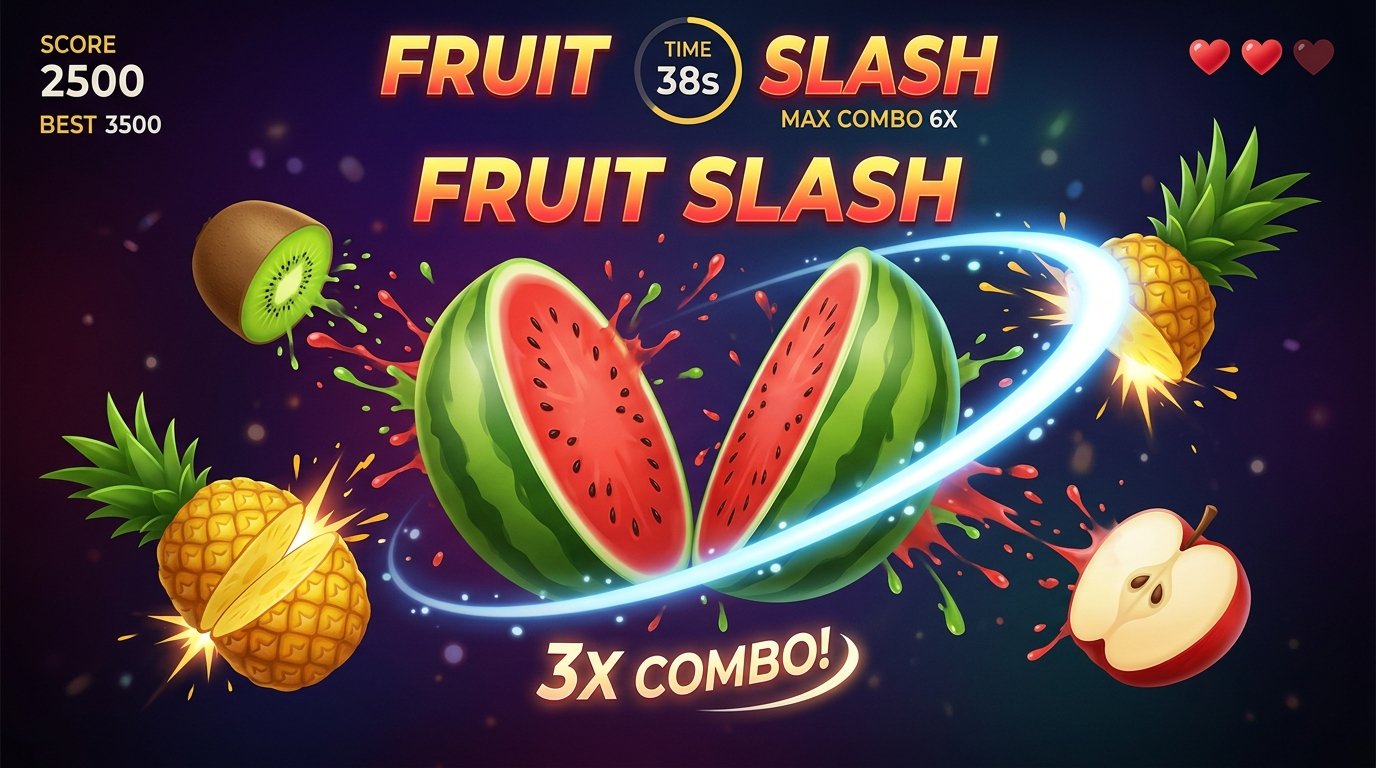
This master prompt instructs AI models to build a full-featured, 60-second fruit-slicing arcade game written entirely in raw HTML5, CSS3, Vanilla JavaScript, and the Canvas API. The prompt produces a single `index.html` file with zero external images, libraries, or build steps required. Opening the generated file directly in any modern web browser delivers an immediate, interactive gaming experience.
The prompt enforces procedural Canvas graphics for rendering fruit silhouettes, seeds, interior flesh, bombs, slash trails, and juice splash particles. It includes a custom projectile physics engine tuned for smooth, controlled motion, along with dynamic fruit-splitting logic, combo scoring multipliers, visual HUD elements, screen shake feedback, and synthesized procedural audio using the Web Audio API.
Built with clean game-state architecture (Home, How to Play, Playing, Paused, Game Over), the resulting code persists best scores and settings via browser `localStorage`. Optimized for mobile-first play with Pointer Events, the generated game scales to portrait mobile screens and desktop displays while maintaining locked frame-rate-independent gameplay using `requestAnimationFrame` and delta time.
Customer Reviews
No reviews yet. Be the first to share your thoughts!
The Genius Prompt
MASTER PROMPT — BUILD A PREMIUM FRUIT NINJA-STYLE GAME

You are an expert HTML5 Canvas game developer, JavaScript game-engine developer, UI/UX designer, motion designer, and mobile game designer.

Build a complete, polished, highly responsive browser game called:

🍉 FRUIT SLASH

The game should be inspired by the fruit-slicing arcade genre, but DO NOT copy any copyrighted branding, logos, artwork, sounds, or proprietary assets from Fruit Ninja.

Create an original visual identity and original procedural graphics.

The final game must look and feel like a premium mobile arcade game, not like a basic HTML/JavaScript demo.

🚨 MOST IMPORTANT REQUIREMENT

Everything MUST be contained inside:

index.html

There must be:

NO separate CSS file

NO separate JavaScript file

NO image files

NO JSON files

NO external assets

NO backend

NO build process

Put everything inside the single HTML file:

<!DOCTYPE html> <html> ... </html>

Use:

HTML5

CSS3

Vanilla JavaScript

HTML5 Canvas

Web Audio API

localStorage

requestAnimationFrame

Pointer Events

Do NOT use:

React

Vue

Angular

Phaser

Three.js

PixiJS

Bootstrap

Tailwind

jQuery

Any external framework

The final index.html must work by simply opening it in a modern browser.

🎯 MAIN GOAL

Create a 60-second fruit slicing arcade game where fruits are launched from the bottom of the screen.

The player uses:

Finger on mobile

Mouse on desktop

Stylus where supported

to swipe across fruits and slice them.

The game should be:

Smooth

Slightly slow-paced

Responsive

Easy to understand

Satisfying

Visually impressive

Fair

Mobile-first

Reel-friendly

IMPORTANT:

Do NOT make the gameplay extremely fast.

The player must have enough time to:

See the fruit

Identify the fruit

Move toward it

Swipe through it

See the slicing animation

The gameplay should feel controlled and premium, not chaotic.

🎨 VISUAL STYLE

Create an original premium arcade visual style.

Use a dark cinematic background with:

Deep gradients

Subtle atmospheric particles

Soft glows

Floating light particles

Slight depth effect

Vignette

Subtle animated background movement

The game should immediately look impressive when opened.

Avoid:

Plain backgrounds

Generic HTML styling

Cheap-looking buttons

Excessive text

Emoji-based graphics

Static screens

Default browser controls

🍉 FRUITS

Create at least these fruits:

Watermelon

Apple

Orange

Banana

Kiwi

Pineapple

Peach

DO NOT use external images.

DO NOT use emojis as the main graphics.

Instead, draw the fruits procedurally using Canvas.

Each fruit should have:

Unique silhouette

Gradient shading

Highlight

Shadow

Subtle texture

Rotation

Smooth movement

Appropriate colors

Individual visual identity

The fruits should look recognizable even without labels.

🍉 PROCEDURAL FRUIT DESIGN

Use Canvas drawing functions.

For example:

Watermelon:

Green outer shell

Dark green stripes

Red interior

Black seeds

Highlight

Apple:

Rounded body

Red gradient

Small stem

Leaf

Orange:

Orange circular body

Highlight

Subtle texture

Banana:

Curved yellow shape

Brown ends

Highlight

Kiwi:

Brown exterior

Green interior

Small black seeds

Pineapple:

Yellow textured body

Green leaves

Peach:

Orange/pink gradient

Soft highlight

Make the fruits visually polished.

💣 BOMBS

Create original procedural bombs.

Bomb design:

Dark metallic sphere

Slight highlight

Fuse

Small glowing ember

Subtle rotation

Bombs must be clearly distinguishable from fruits.

Bombs should NOT appear too frequently.

Bombs should never create unfair situations.

🧠 GAME STATES

Implement a clean game-state architecture:

HOME HOW_TO_PLAY PLAYING PAUSED GAME_OVER

Only the correct logic should run for the current state.

For example:

Timer does not run on HOME.

Fruits do not spawn on HOME.

Timer pauses during PAUSED.

Spawning stops on GAME_OVER.

Input should behave correctly in every state.

🏠 HOME SCREEN

Create a premium home screen.

Main title:

FRUIT SLASH

Subtitle:

SLICE. COMBO. SURVIVE.

Add a large premium:

PLAY

button.

Also include:

HOW TO PLAY

and:

SOUND

buttons.

The background should have subtle moving fruit silhouettes/particles.

Add small animated visual elements so the screen doesn't feel static.

🎮 START GAME

When PLAY is pressed:

Play a short button sound

Animate the home UI away

Transition smoothly into gameplay

Start the timer

Begin fruit spawning

Do NOT instantly jump between screens.

Use a short polished transition.

🍉 FRUIT PHYSICS

Each fruit should have:

x y vx vy gravity rotation rotationSpeed radius scale type sliced

Use realistic arcade projectile physics.

Recommended initial values:

gravity: approximately 650–800 initial upward velocity: approximately -650 to -800 horizontal velocity: approximately -180 to 180

These are starting values.

Tune them to produce smooth gameplay.

The exact values should adapt to different screen sizes.

🐢 IMPORTANT — GAME SPEED

The game MUST intentionally be slower than a typical fast arcade clone.

Target:

First 10 seconds

Very easy.

10–25 seconds

Easy → medium.

25–40 seconds

Medium.

40–50 seconds

Medium → challenging.

50–60 seconds

Intense but still fair.

Never suddenly double the speed.

Use smooth difficulty interpolation.

The player should always feel that they have enough reaction time.

🚀 FRUIT LAUNCHING

Fruits should launch from the lower portion of the screen.

Use multiple launch zones:

Left

Center-left

Center

Center-right

Right

Randomize the launch position.

But avoid extreme randomness.

Fruits should generally remain within the visible gameplay area.

Use slightly randomized:

Horizontal velocity

Vertical velocity

Rotation speed

Rotation direction

Scale

🍉 SPAWN SYSTEM

Create a professional spawn manager.

Early game:

1–2 fruits at a time

Spawn interval around 750–1100ms

Very low bomb probability

Middle game:

2–4 fruits

Faster spawning

Moderate bomb probability

Late game:

3–5 fruits

Slightly faster spawning

Increased bomb probability

Never spawn too many objects simultaneously.

Never make the game visually overwhelming.

⚖️ FAIRNESS SYSTEM

Implement basic fairness rules.

Do NOT:

Spawn bombs directly beside several fruits repeatedly

Spawn objects outside playable space

Create impossible combinations

Spawn too many objects at exactly the same location

Make the player lose because of an unavoidable collision

The game should feel challenging because of skill, not randomness.

🗡️ SLICING INPUT

Use Pointer Events.

Support:

pointerdown pointermove pointerup pointercancel

Support:

Mouse

Touch

Stylus

Set:

touch-action: none;

on the game surface.

Prevent:

Page scrolling

Browser gestures interfering with gameplay

Text selection

Accidental dragging

🗡️ SLASH TRAIL

Create a beautiful slicing trail.

The trail should:

Follow the pointer smoothly

Use interpolation

Contain approximately 15–25 points

Fade progressively

Have a bright center

Have a soft glow

Become shorter over time

Automatically disappear

The trail should feel like a fast blade swipe.

Avoid a thick ugly line.

Make it elegant and premium.

🎯 SLICE COLLISION

Detect the intersection between:

Pointer movement segment

Fruit hitbox

Use proper line-circle or line-shape collision logic.

Do NOT require pixel-perfect accuracy.

Increase effective hit detection by around 10–15%.

A reasonable swipe should count.

One swipe must be able to slice multiple fruits.

Prevent the same fruit from being sliced multiple times.

💥 FRUIT SPLITTING

When a fruit is sliced:

DO NOT simply remove it.

Create two physical halves.

Each half should:

Move independently

Rotate independently

Fall downward

Have different horizontal velocities

Have slightly different rotation speeds

Fade naturally

Draw the sliced interior.

For example:

Watermelon:

Green outer shell

Red inner flesh

Black seeds

Orange:

Orange peel

Lighter interior

Kiwi:

Brown peel

Green interior

Black seeds

Make the sliced pieces look visually convincing.

💦 JUICE EFFECT

When a fruit is sliced:

Spawn juice particles.

Particles should include:

Fruit-colored droplets

Small dots

Tiny splashes

Glow particles

Give them:

Velocity

Gravity

Alpha

Size

Lifetime

The juice effect should last roughly 400–700ms.

Keep it visually controlled.

Do not cover the whole screen.

✨ SLICE IMPACT

Every successful slice should have:

Tiny impact flash

Juice particles

Fruit halves

Score popup

Small screen shake

Sound effect

Combo update

The result should feel satisfying.

🔥 COMBO SYSTEM

Implement a combo system.

If fruits are sliced within a combo window:

2X COMBO 3X COMBO 4X COMBO 5X COMBO 6X COMBO ...

Use approximately:

1.2–1.5 seconds

as the combo continuation window.

Make the combo system forgiving.

Do not reset immediately after a single missed slice.

🏆 COMBO SCORING

Example:

Normal fruit:

+10

2x:

+20

3x:

+30

4x:

+40

5x:

+50

Continue dynamically.

Rare/larger fruits can provide slightly higher base points.

🔥 COMBO UI

When a combo is achieved:

Show something like:

3X COMBO!

Animate it:

Scale from 80%

Grow to 110%

Settle to 100%

Slightly rotate

Glow

Move upward

Fade out

Do not constantly show combo text.

Only display it when meaningful.

💣 BOMB MECHANICS

Bombs should move slightly slower than fruits.

Give them:

Clear silhouette

Fuse glow

Subtle pulse

Rotation

When sliced:

Explosion

Particles

Flash

Screen shake

Sound

Lose one life

The bomb explosion should be impressive but not excessive.

❤️ LIVES

Player starts with:

3 lives

Display:

❤️ ❤️ ❤️

When a bomb is sliced:

Remove one life

Animate the heart

Slight HUD shake

Play damage sound

When lives reach zero:

Trigger GAME OVER.

⏱️ 60 SECOND MODE

Game duration:

60 seconds

Display a visual timer.

Prefer a circular timer or clean progress indicator.

Also show:

TIME 60

The timer must:

Decrease smoothly

Never freeze unexpectedly

Pause correctly

Stop at zero

At zero:

Stop spawning

Allow current objects to finish their animation briefly

Transition to Game Over

📊 HUD

Create a premium minimal HUD.

Top-left:

SCORE 1250

Top-center:

TIME 42

Top-right:

❤️ ❤️ ❤️

Under score:

BEST 2500

HUD must not block gameplay.

Use responsive positioning.

Support mobile safe areas.

📈 SCORE ANIMATION

Whenever the player scores:

Slightly enlarge score

Return smoothly to normal size

Example:

1000 → 1010

Animate the change subtly.

Do not use a huge distracting animation.

🏆 HIGH SCORE

Use:

localStorage

Store:

Best score

Highest combo

Fruits sliced

High score must survive:

Refresh

Browser restart

Closing the tab

🏁 GAME OVER SCREEN

Create a premium Game Over screen.

Show:

GAME OVER SCORE 1250 BEST 3000 MAX COMBO 6X FRUITS SLICED 34

If the player beats the previous score:

🔥 NEW HIGH SCORE!

Animate it.

Buttons:

PLAY AGAIN

HOME

Buttons must work.

🆕 NEW HIGH SCORE

If the current score exceeds the saved best score:

Play special sound

Trigger small particle burst

Animate NEW HIGH SCORE

Save the new score

Do not show it if the score did not beat the previous record.

⏸️ PAUSE SYSTEM

Add a pause button during gameplay.

When paused:

Stop game physics

Stop timer

Stop spawning

Stop gameplay animations

Keep UI responsive

Show:

PAUSED RESUME RESTART HOME

Resume must continue correctly.

🔊 AUDIO

Use the Web Audio API.

No external sound files.

Create simple procedural sounds for:

Button click

Fruit slice

Combo

Bomb

Explosion

Life lost

Game over

New high score

Keep audio subtle and pleasant.

Add:

🔊 SOUND ON

and:

🔇 SOUND OFF

The setting should persist using localStorage.

Do not play sound before the user interacts with the page because of browser autoplay restrictions.

📖 HOW TO PLAY

Create a polished modal.

Title:

HOW TO PLAY

Content:

🖐️ Swipe across fruits to slice them. 🔥 Slice quickly to create combos. 💣 Avoid bombs. ❤️ You have 3 lives. ⏱️ Score as much as possible in 60 seconds.

Use actual UI icons/CSS where practical instead of relying entirely on emojis.

Button:

GOT IT

📱 MOBILE-FIRST DESIGN

This is extremely important.

Design primarily for:

Android smartphones in portrait mode.

The game should work correctly at:

360 × 640

375 × 667

390 × 844

412 × 915

Larger mobile screens

Also support:

Desktop

Tablet

Canvas must automatically resize.

Do not stretch the game incorrectly.

Maintain aspect ratio and gameplay coordinates.

👆 TOUCH EXPERIENCE

Touch slicing must feel extremely responsive.

When the player touches the screen:

Immediately start the slash

Track movement smoothly

Detect fruit collisions

Release cleanly

Do not add noticeable input delay.

Do not require slow swipes.

Fast and slow swipes should both work.

🖥️ DESKTOP EXPERIENCE

Mouse input must work exactly like touch.

Support:

Mouse click

Mouse drag

Pointer movement

The cursor should not interfere with the gameplay.

🎬 PREMIUM MOTION DESIGN

Use subtle motion everywhere.

Examples:

Home screen:

Floating particles

Subtle fruit movement

Button hover animation

Gameplay:

Fruit rotation

Smooth trajectories

Slash trail

Juice particles

Score animations

Combo animation

Game Over:

Smooth panel entrance

Score counting animation

Button animations

Avoid excessive animations.

Everything should feel intentional.

📳 SCREEN SHAKE

Implement a reusable screen-shake system.

Use small shake for:

Fruit slicing

Medium shake for:

Combo milestone

Stronger shake for:

Bomb explosion

Keep screen shake short.

Do not make the game uncomfortable.

✨ BACKGROUND PARTICLES

Create a lightweight background particle system.

Particles should:

Slowly float

Fade

Move subtly

Have low opacity

They should create atmosphere without distracting from gameplay.

Limit the number of particles for performance.

⚡ PERFORMANCE

Target:

60 FPS

Use:

requestAnimationFrame()

Use delta time.

Do NOT make gameplay dependent on frame rate.

For example:

If the device runs at 30 FPS, the game should not become twice as slow.

Use proper time-based movement.

Optimize:

Collision checks

Particle count

Object creation

Canvas rendering

Use object pooling where useful.

Avoid unnecessary DOM manipulation during gameplay.

🧩 CODE ARCHITECTURE

Even though everything is inside one file, organize JavaScript into clear sections:

CONFIGURATION CANVAS SETUP GAME STATE INPUT SYSTEM FRUIT CLASS BOMB CLASS FRUIT SPAWNER PHYSICS COLLISION SYSTEM SLICE SYSTEM PARTICLE SYSTEM JUICE SYSTEM COMBO SYSTEM SCORE SYSTEM LIVES SYSTEM AUDIO SYSTEM UI SYSTEM LOCAL STORAGE SCREEN SHAKE GAME LOOP RESIZE HANDLER INITIALIZATION

Use classes/functions where appropriate.

Keep the code readable.

🛡️ ERROR PREVENTION

Do not leave:

TODO

FIXME

Placeholder functions

Empty functions

Fake buttons

Broken event listeners

Console errors

Missing variables

Undefined functions

Every feature mentioned in this prompt MUST actually work.

🧪 TEST EVERYTHING

Before giving me the final code, thoroughly inspect the logic.

Test:

Home

PLAY works

HOW TO PLAY works

SOUND works

Gameplay

Fruits spawn

Fruits move smoothly

Fruits are slow enough

Fruits can be sliced

Multiple fruits can be sliced

Slash trail works

Juice effects work

Fruit halves work

Score works

Combo works

Bombs work

Lives work

Timer works

Pause

Pause works

Resume works

Restart works

Home works

Game Over

Game ends correctly

Score is correct

Best score is correct

Max combo is correct

Restart works

Home works

Mobile

Touch works

No scrolling

No accidental browser gestures

Canvas scales correctly

Desktop

Mouse works

Resize works

Persistence

Best score survives refresh

Sound preference survives refresh

There must be no major gameplay bugs.

🎯 GAME BALANCE

The final game should feel like this:

0–10 sec

Relaxed.

The player learns the mechanics.

10–25 sec

Comfortable.

More fruits begin appearing.

25–40 sec

Engaging.

Combos become easier to create.

40–50 sec

Challenging.

More objects and occasional bombs.

50–60 sec

Exciting.

Higher spawn rate and more difficult patterns.

But NEVER unfair.

The player should feel:

“I could have done better.”

Not:

“The game was impossible.”

🚨 DO NOT MAKE THESE MISTAKES

Do NOT:

Make fruits extremely fast

Spawn 10+ fruits immediately

Spawn bombs everywhere

Use emoji fruits as the main graphics

Use plain CSS circles as final fruit designs

Make the slash trail lag

Make collision too strict

Make collision too generous

Let fruits spawn outside the screen

Let UI cover fruits

Break touch input

Break mouse input

Use external libraries

Use external images

Create multiple files

Give pseudo-code

Give incomplete code

Leave unfinished features

🎥 REEL-READY REQUIREMENT

This game will be recorded for an Instagram Reel.

Therefore the first few seconds must look visually impressive.

When I press PLAY, immediately show:

Beautiful fruit launch

Smooth slicing

Slash trail

Juice particles

Score popup

Combo

Professional HUD

The gameplay should be understandable even when someone watches the reel without audio.

Create strong visual feedback.

🏆 FINAL QUALITY BAR

Do NOT think:

“This is just an HTML game.”

Think:

“I am building a polished mobile arcade game that happens to run inside a browser.”

The final result must look significantly better than a typical AI-generated HTML game.

Prioritize:

GAME FEEL > VISUAL POLISH > RESPONSIVENESS > FAIRNESS > PERFORMANCE

The game must be:

slow + smooth + satisfying + polished + responsive + visually impressive.

📦 FINAL RESPONSE FORMAT

After completing the implementation, provide:

The complete index.html code.

A very short explanation of how to run it.

A short list of implemented features.

Do NOT split the code into multiple files.

Do NOT omit any code.

Do NOT replace code with explanations.

The final answer must contain the complete working index.html.
Usage Instructions
Tags
What you get
This master prompt instructs AI models to build a full-featured, 60-second fruit-slicing arcade game written entirely in raw HTML5, CSS3, Vanilla JavaScript, and the Canvas API. The prompt produces a single `index.html` file with zero external images, libraries, or build steps required. Opening the generated file directly in any modern web browser delivers an immediate, interactive gaming experience.
The prompt enforces procedural Canvas graphics for rendering fruit silhouettes, seeds, interior flesh, bombs, slash trails, and juice splash particles. It includes a custom projectile physics engine tuned for smooth, controlled motion, along with dynamic fruit-splitting logic, combo scoring multipliers, visual HUD elements, screen shake feedback, and synthesized procedural audio using the Web Audio API.
Built with clean game-state architecture (Home, How to Play, Playing, Paused, Game Over), the resulting code persists best scores and settings via browser `localStorage`. Optimized for mobile-first play with Pointer Events, the generated game scales to portrait mobile screens and desktop displays while maintaining locked frame-rate-independent gameplay using `requestAnimationFrame` and delta time.
Customer Reviews
No reviews yet. Be the first to share your thoughts!
Earn by Selling Prompts
Are you a prompt engineer? Start selling prompts on Omexa and generate sales income.